CBSE-IX-Foundation percent 20of%20Information%20Technology%20.
11: MS-Excel 2007
- #3Write command for the operations (i) to (iii) based on the spreadsheet below:
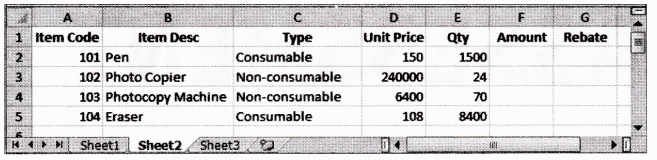
- To calculate the Amount as Unit Price*Qty for each item in Column F.
- To calculate the Rebate as 7% of Amount if Type is consumable, else calculate Rebate as 11% of Amount in Column G.
- To calculate total Rebate across all items in cell G6.
Ans :- At cell F2, type =D2*E2 and then copy this formula using mouse Fill handle onto range F3 : F5.
- At cell G2, type =IF(C2=”Consumable”, F2*0.07, F2*0.11) and then copy this formula using mouse Fill handle onto range G3 : G5.
- At cell G6, type =SUM(G2 : G5).
- To calculate the Amount as Unit Price*Qty for each item in Column F.