CBSE-IX-Foundation of Information Technology .
08: MS-Word 2007 Basics
Note: Please signup/signin free to get personalized experience.
Note: Please signup/signin free to get personalized experience.
10 minutes can boost your percentage by 10%
Note: Please signup/signin free to get personalized experience.
- #Foundation of Information Technology - MS-Word 2007 Basics
- #Section : AVery Short Answer Type Questions
- Qstn #1How do you locate MS-Word 2007 on your computer system?Ans : To locate MS-Word on our computer system:
Click Start —> All Programs —> Microsoft Office —> Microsoft Office Word 2007.
- Qstn #2What is the use of ruler in MS-Word 2007 document?Ans : Ruler is used to set tabs, indents and margins for a document.
- Qstn #3What is formatted text?Ans : Formatted text has styling information beyond the minimum of semantic elements: Colors, styles (bold face, italic), sizes and special features such as hyperlinks.
- Qstn #4Write the name of alignments, which are available in MS-Word 2007.Ans : Left, Right, Center and Justify.
- Qstn #5What is the use of Crop option in MS-Word 2007?Ans : Crop option allows a user to edit pictures (only cropping).
- Qstn #6Write the steps to make the text bold.Ans : Steps to make a text bold are as follows:
- Step 1: Select the text.
- Step 2: Click the Bold button in the Font group on the Home tab.
- Step 1: Select the text.
- Qstn #7Write the shortcut keys to format the text style bold, italic and underline.Ans : Bold - Ctrl+B, Italic - Ctrl+I, Underline - Ctrl+U
- Qstn #8What are the basic features of printing in MS-Word 2007?Ans : The basic features of printing in MS-Word 2007 are as follows:
- Print
- Quick Print
- Print Preview
- Print
- Qstn #9How can you print your document via Quick Print feature of printing?Ans : To print a document via Quick Print
Click Microsoft Office Button —> Print —> Quick Print.
- #Section : BShort Answer Type Questions
- Qstn #1Define MS-Word 2007.Ans : MS-Word 2007 is a Word processing software package, which allows you to easily create a variety of professional looking documents like letters, reports and other documents using features such as Themes, Styles, SmartArt and more. It is a powerful tool chat you can use to create effective documents.
- Qstn #2What do you mean by ruler?Ans : Ruler appears on the top and on the left side of the document window. It allows to format the horizontal or vertical alignment of text in a document.
Two types of rulers are available in MS-Word 2007 as follows:
- Horizontal ruler indicates the width of the document.
- Vertical ruler indicates the height of the document.
- Horizontal ruler indicates the width of the document.
- Qstn #3Write the steps to create a new document.Ans : Steps to create a new blank document are as follows:
- Step 1: Click the Microsoft Office button.
- Step 2: Select New, the New Document dialog box will appear as shown below:
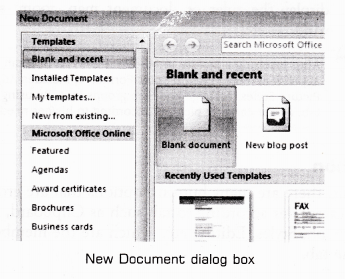
- Step 3: Select Blank document under the Blank and recent section (It will be highlighted by default).
- Step 4: Click Create button, a new blank document will appear.
- Step 1: Click the Microsoft Office button.